Search in Wiki
To find text on an individual Wiki page, see Finding text on a page.
To search the text on Wiki pages:
-
In the left-hand panel of Wiki, click Search.
-
Enter a query in the search bar. Pages containing the text you entered appear below the search bar.
Recent changes to Wiki pages may appear in search results with a delay because pages are indexed every 30 minutes.
-
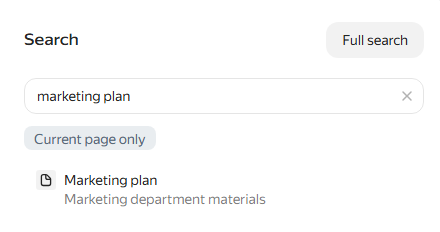
To search only in the current cluster and its subpages, open search from a page in the cluster and click Only in current cluster. The Cluster: label with the current cluster name appears below the search bar.
To search all of Wiki again, click × in the label. The Only in current cluster button is not available on the Wiki home page.
-
To open the full search results page, click Advanced search. You can also press Enter.
-
On the full search results page, use the filters in the panel on the right:
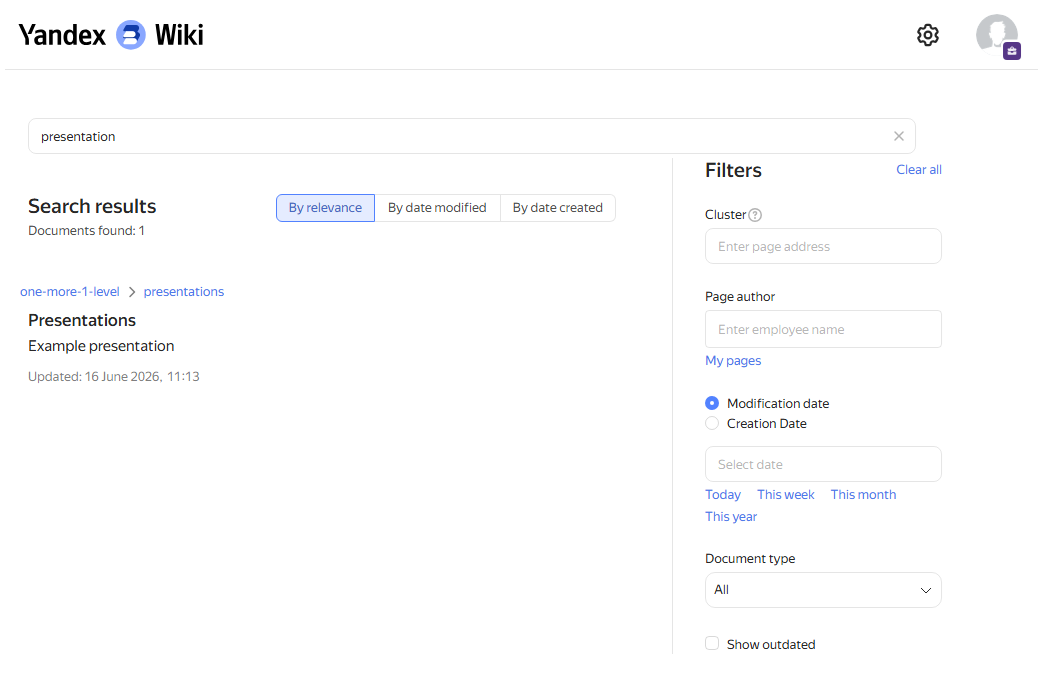
- Cluster. The cluster address relative to the
wiki.yandex.comhome page. For example, to find text on subpages in thewiki.yandex.com/users/userNamecluster, enterusers/userName. - Page author. The name or username of the author of the Wiki page.
- Created date or Updated date. The period when the page was created or last changed.
- Document type. Search for Wiki documents of a specific type: page, table, or file.
- Cluster. The cluster address relative to the
-
Sort the results by relevance, update date, or creation date.