Choose a wiki page access type
In Yandex Wiki, you can choose who can view and edit your pages. You can configure access only for users in your organization.
Space visibility determines who can see it in the catalog and search. It doesn't change access to the pages in the space.
If you need to make a page available to users outside your organization, use a public link. Anyone on the internet can access the page via the public link without signing in.
Default settings
By default, for the top-level page of a general cluster, such as wiki.yandex.com/agency, the access type is set to All employees.
For the top-level page of a personal cluster, such as wiki.yandex.com/users/john, the access type is set to Some employees.
All their subpages will have the access type Same as parent page. To learn how the page hierarchy works, go to Yandex Wiki structure.
Access settings can be changed by the author and co-authors of the page, as well as by the Wiki administrator.
Choose an access type
The access type is a basic page setting that defines the group of users who can view the page. You can grant access to all employees at once or make the page private — then only the users you select will see it. For subpages, inheritance of settings from the parent page is enabled by default.
-
At the top of the page, click the button with the access type, for example All employees.
The Wiki administrator can change the page settings even if they don't have access to it: click Open settings.
-
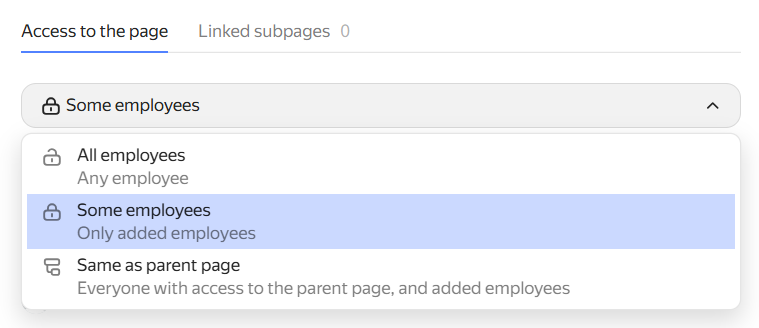
Under Page access, select an option:
-
All employees — all organization employees can view the page.
-
Some employees — only users in the Personal and Via an invite link lists retain access to the page. Authors can add new users or groups who need access to the page. Setting up permissions for individual users on a wiki page
-
Same as parent page — users added to the Personal list on the top-level page get access to the page: How inheritance works. You can also grant access to other users.
You can only set this access type for second-level pages and below: Yandex Wiki structure.
-