How settings are inherited from a parent page
Let's look at an example cluster where page access types are configured:
- wiki.yandex.com/agency/ — All employees.
- wiki.yandex.com/agency/management/ — Some employees.
- wiki.yandex.com/agency/management/sales/ — Same as parent
- wiki.yandex.com/agency/management/sales/group-1 — Same as parent.
The fourth page /agency/management/sales/group-1 will inherit:
- The main access type Some employees from the first page in the inheritance chain: /agency/management/.
- The list of authors, co-authors, and editors from all pages in the chain: /agency/management/ and /agency/management/sales/.
View the list of inherited users
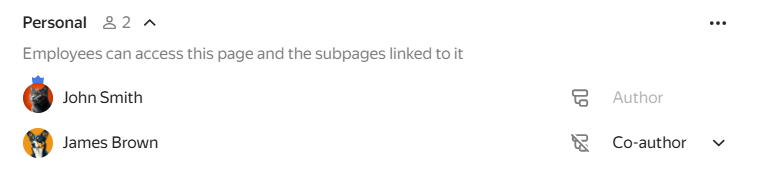
You can view inherited users in the access settings, under From the parent page. You can also add other users; they will appear in the Personal list.
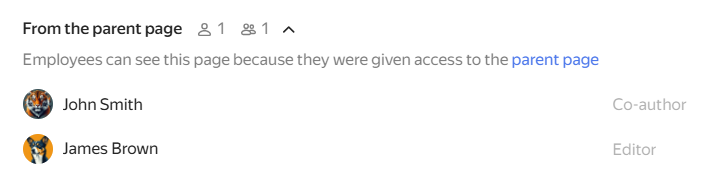
Lists of users with access
View the list of subpages
You can view the list of pages that inherit settings from the parent:
- Open the parent page.
- At the top of the page, click the button with the access type, for example All employees.
- Go to the Linked subpages tab.
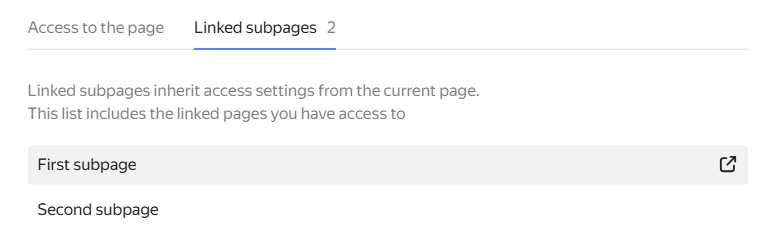
List of subpages
Block a user's access to subpages
To exclude one or more users from the From parent page list:
- Open the parent page.
- At the top of the page, click the button with the access type, for example All employees.
- Click next to the user you want to exclude. The selected user will lose access to the subpages.
To restore their access, click . - If needed, add the user to a subpage with a different role, such as Reader.
What happens if you delete a parent page
-
If a parent page is in the middle of a cluster, for example wiki.yandex.com/agency/management/, after it's deleted, the subpage will start inheriting access from the page one level up: wiki.yandex.com/agency/.
-
If you delete a top-level parent page (wiki.yandex.com/page/), the subpage will get the same access type as the parent, for example All employees.
However, if the parent page's access type is Some employees, all its authors, editors, and readers will lose access to the subpages. To keep access for these users, add them to the Personal list on each subpage.
What happens if you move a subpage
When moving a page with the Same as parent page access type, you need to configure its access settings:
-
Update access type: The page will inherit access settings from the new parent page.
-
Keep current access type: The page will have the same access type as its current parent, for example, All employees.
If the parent page has the Some employees access type selected, the users and groups from that list won't be copied when the page is moved. To keep the current access settings, change the access type and add users manually before moving the page.