Workflows: how to set up statuses, transitions, and issue types in a queue
A department's or team's work usually consists of a flow of similar issues that employees handle using a specific sequence of actions or stages. To make it convenient for your employees to handle issues in Tracker, you need to bring your team's workflow into Tracker.
In Tracker, a workflow is linked to an issue queue. It can include several issue types (for example, requests, new feature development, or bug fixes), the stages of working on issues (statuses), and the sequence in which statuses are passed through.
A workflow applies within the queue it's set up in. You can add several workflows to each queue if you need to set up different sets of statuses for different issue types.
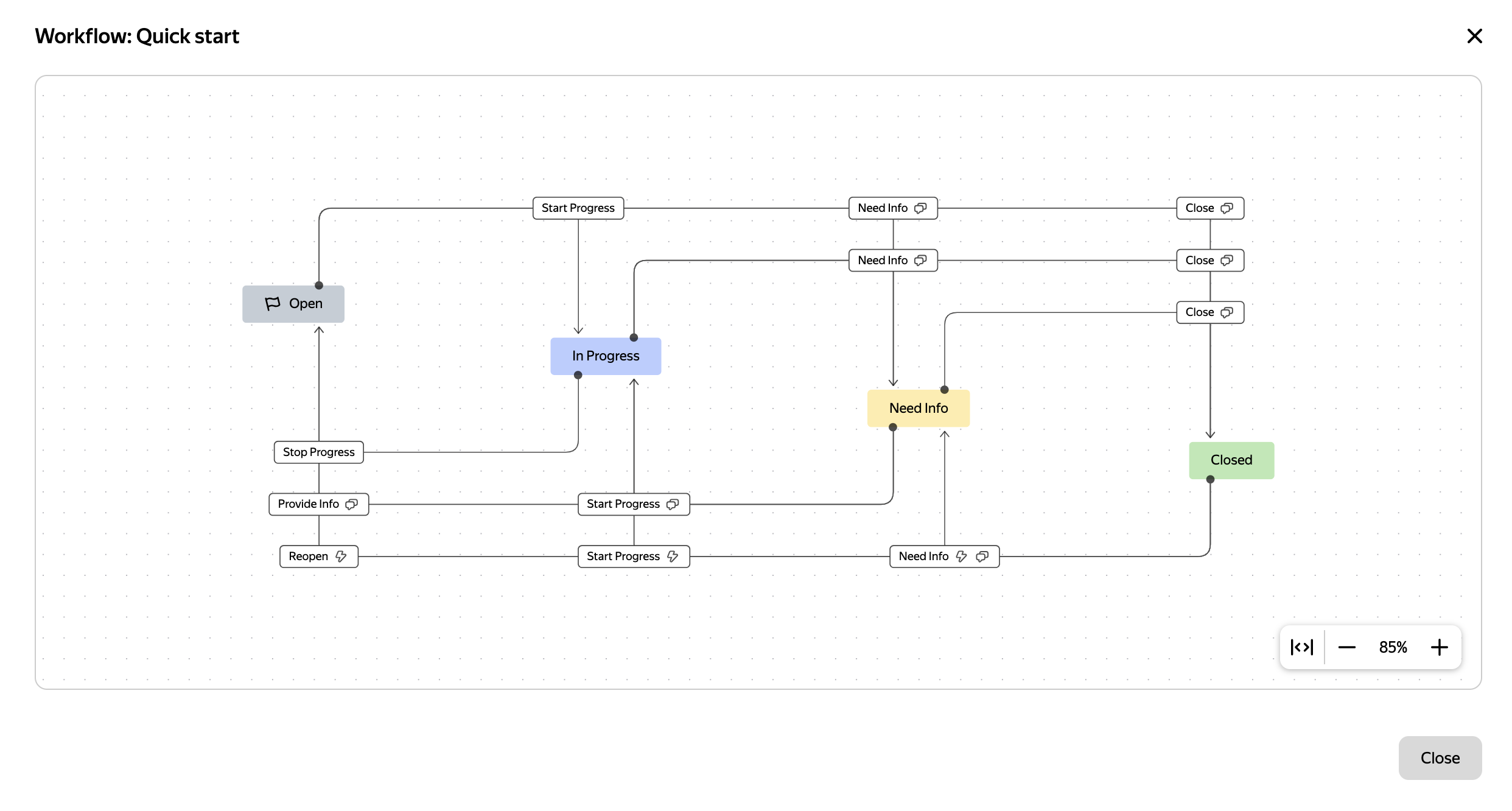
A workflow in Tracker: statuses and transitions between them
In the diagram in the workflow visual editor, statuses are rectangular blocks colored according to the status types, and the arrows between the blocks are transitions.
What a workflow consists of
A workflow is characterized by the following Tracker entities:
-
Issue statuses — the set of statuses that issues can pass through during the work.
-
Transitions between statuses — determine whether you can move from one status to another. You can also use transitions to set up automatic actions that are performed when the status changes, and transition screens so that users fill in certain issue fields.
-
Issue types — workflows apply to selected issue types, such as New feature, Improvement, or Bug. For each issue type, you can select a set of allowed resolutions.
For different issue types in a queue, you can create several workflows to account for the specifics of handling issues of each type.
Do I need to create a workflow immediately when creating a queue?
No, when a queue is created, a template with a standard workflow is used. This workflow immediately applies to the queue issues. In the workflow editor, the queue owner can use the diagram to see how the workflow is structured, adjust it, or create new workflows for new issue types.
How to manage workflows
Workflows in a queue can be managed by the queue owner and the users they've granted access to the queue settings.
To set up a workflow in a queue:
- Create a new workflow or copy the standard one: How to create a workflow
- Add the necessary statuses to the workflow diagram: How to set up issue statuses
- Set up transitions between statuses: How to set up transitions
- Add issue types to the workflow: How to add issue types
- Add resolutions to the issue types in the workflow: How to add resolutions
A queue is a space for issues related to a single process, product, team, or department. A queue helps you store issues in one place and manage work according to common rules.
A resolution is an issue parameter that shows why an issue was closed. For example: Resolved, Won't fix, or Duplicate. You can add resolutions in the queue settings.
A status is an issue parameter that shows the current stage of the issue. For example , , .