How to assess employee workload
On the Resource management page, you can view the workload of any employees. For example, a manager can find employees in their department and see who is working on which projects, as well as redistribute work in time so that issues and projects are completed on schedule.
Open the page: in the left panel, click Projects and portfolios → Manage resources or follow the link https://tracker.yandex.com/pages/resources .
Finding employees by parameters
-
Use the Dates parameter to specify the time period within which you want to check employee workload. The period can be specified in days, months, quarters, or years.
-
To view the list of employees in a group or department, click Group and start typing its name. You can select multiple groups.
-
To quickly find a specific employee, enter their name or login in the search bar.

Assess workload across all projects
Employee workload is shown on the overall chart: each employee's row contains their issues from all projects.
- You can switch the scale between Months and Quarters.
- Time intervals when an employee's total workload exceeds their available working time are highlighted in red. Overload takes into account issues from different queues and projects.
- To see the link arrows between issues on the diagram, click Show all links. To view the links of a single issue, hover over it and click the icon.
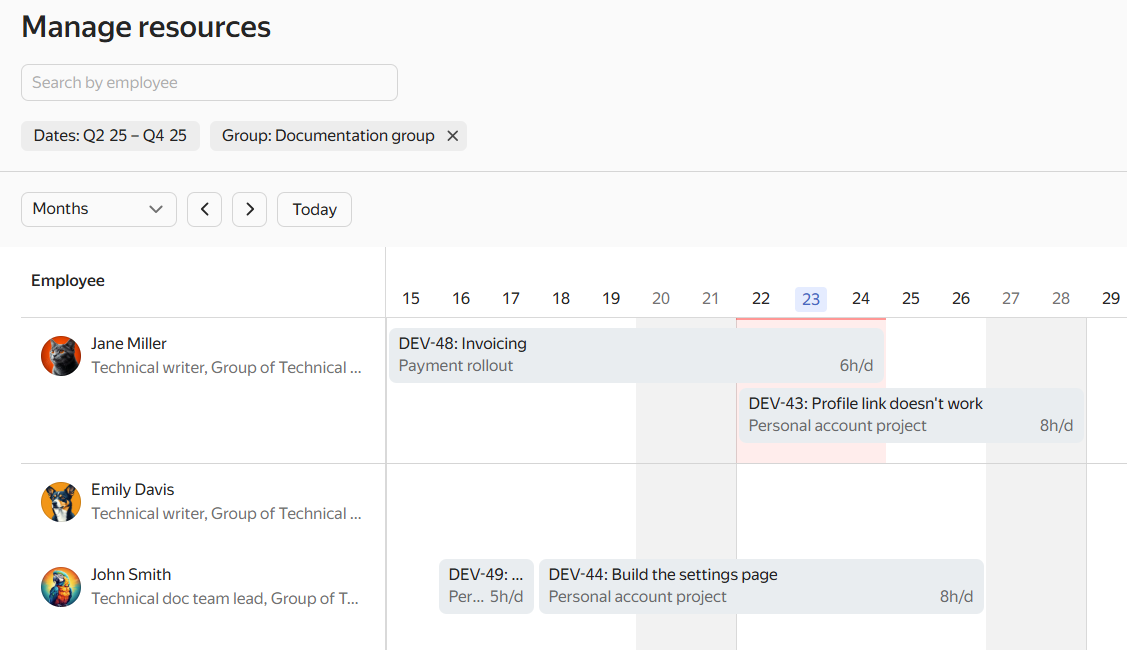
Workload of documentation employees across all projects