Editing portfolio links
You can link a portfolio to other portfolios, projects, or goals. The list of links is shown on the About the portfolio tab, below the portfolio description.
Adding a link to a project or portfolio
To create a link to another project or portfolio:
-
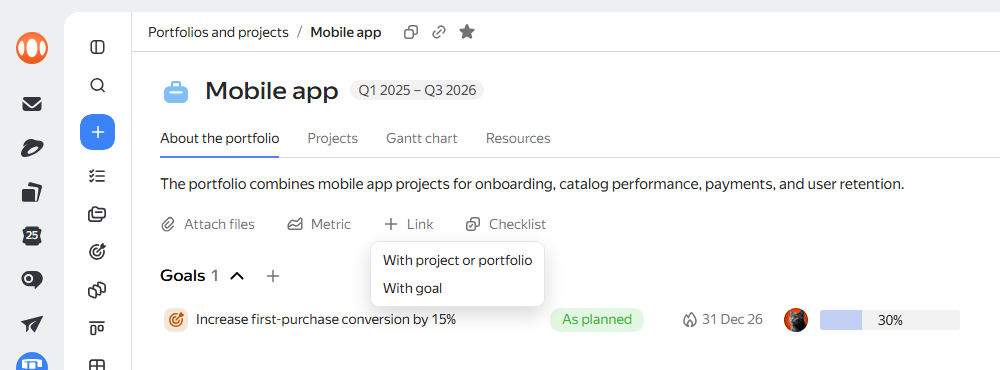
Go to the About the portfolio tab and click Link → With project or portfolio.
-
Choose the appropriate link type:
- Depends on: Start of work on the current portfolio depends on the completion of another project or portfolio.
- Blocks: Execution of this portfolio blocks the start of work on another project or portfolio.
-
Select a project or portfolio to link:
- New: Enter a name, set a deadline, and click Create.
- Existing: Paste a link to the project or select the option you need from the list.
The link appears in the list of linked projects and portfolios.
Adding a link to a goal
To create a link to a goal that the work in the portfolio is aimed at achieving:
-
Go to the About the portfolio tab and click Link → With goal.
-
Choose a goal that you want to link to the project:
-
To create a new goal, select New. Enter the goal name, set the deadline, and click Create.
To open the full goal creation page with all the available parameters, click the icon.
-
To add an existing goal, select Existing. Paste a link to the goal or select the option you need from the list.
-
The link appears in the list of linked goals.
Changing the link type
You can change the link type to another project or portfolio:
- Go to the About the portfolio tab.
- Below the portfolio description, in the Depends on or Blocks list, select the link whose type you want to change.
- Next to the link, click → Change link type and select a new type.
Deleting a link
To delete a link:
- Go to the About the portfolio tab.
- Below the portfolio description, in the Goals, Depends on, or Blocks list, select the link you want to delete.
- Next to the link, click → Delete link.
Adding a metric
You can embed metrics on the portfolio page: Tracker widgets. They are displayed on the About the portfolio tab in a separate Metrics block.
To add a metric:
-
Select a widget on the dashboard and click → Copy link for iframe in the top right corner.
-
Open the entity page and click Metric.
-
Enter the metric name. This name will appear in the widget header.
-
Below, paste the link to the widget.
-
Click Add.
You can edit or delete added metrics. To do this, click in the top right corner of the metric and select an action from the menu.