Burndown chart for tracking sprint progress
Teams that work in short iterations, or sprints, use a burndown chart to track progress. In Yandex Tracker, the chart shows how the amount of work left decreases as issues are completed during a sprint. It helps you assess the team's workload and the progress of planned issues every day.
Burndown charts are available on With backlog and sprints boards. If you use a Basic board, enable a burndown chart and other Agile tools: Enabling Agile tools.
Viewing a burndown chart
To view a burndown chart, open a board with a backlog and sprints and go to the Burn down chart tab.
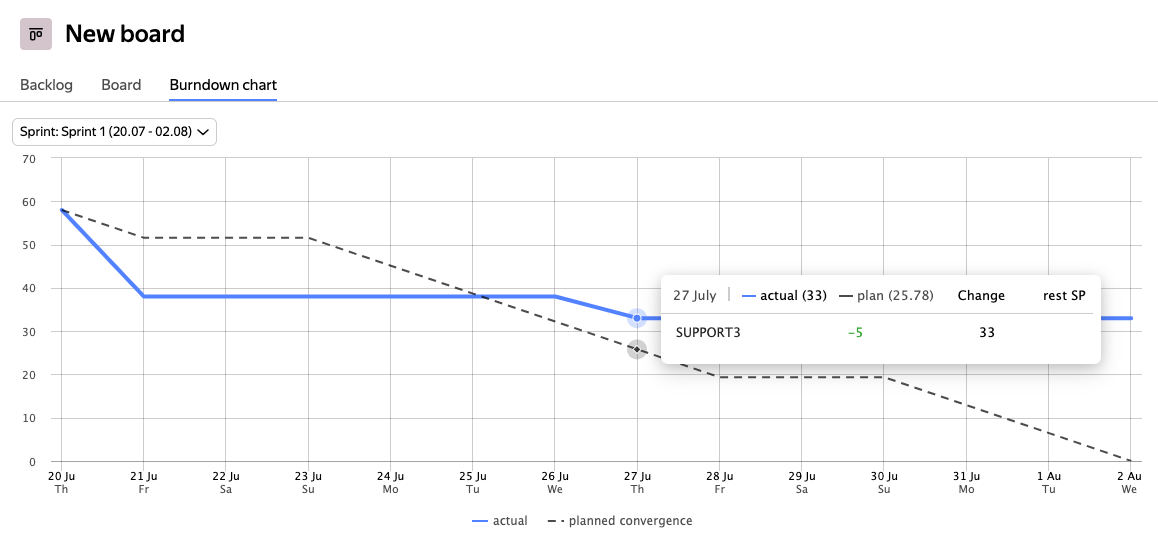
The chart opens for the current sprint. The horizontal axis shows sprint days and the vertical axis shows the workload remaining in Story Points. A dashed line is the planned convergence, while the blue line is the actual convergence.
-
Compare the actual convergence line with the planned convergence line to assess progress:
- If the lines diverge only slightly, the team is likely to complete the sprint issues on time.
- If the actual convergence line is above the planned one, progress is slower than planned.
- If the actual convergence line is below the planned one, the team is completing issues faster than planned.
-
To see how the remaining workload changed on a particular day, hover over the chart at the corresponding point. The pop-up shows which issues changed in Story Points. How the actual convergence line is built
Changes are recorded at the beginning of the working day and compared with the previous day.
-
To open sprint issues from the chart, click a point on the burndown chart. The pop-up is pinned, so you can click an issue name.
How the chart is built
Burndown charts are intended for teams that use Scrum and work in short iterations called sprints. Learn more about Scrum
You can build a burndown chart if you use sprints and estimate issue complexity in Story Points: Planning a sprint.
Burndown charts are available only for the current and upcoming sprints.
Planned convergence
Planned convergence is an ideal line that shows a steady decrease in the planned workload in Story Points during a sprint. It is built according to the following rules:
-
The line starts on the first sprint day at the total Story Points for all sprint issues. It then descends evenly to zero on the last day of the sprint.
-
The line accounts for weekends. The workload does not decrease on weekends, so the chart has steps.
-
The total Story Points are fixed at the moment a sprint starts. You specify them when creating a sprint.
-
If issues are added to or removed from the sprint, the planned convergence line does not change.
Actual convergence
Actual convergence shows the real completion velocity for issues planned in a sprint. The chart is updated each new day according to the following rules:
-
Story Points increase if new issues are added to the sprint after it starts.
-
Story Points decrease if a sprint issue is closed with the Resolved resolution or removed from the sprint.
Story Points on the chart do not decrease if you close issues without specifying a resolution. Learn more about resolutions
-
The sprint workload can also change when issues are re-estimated.