Agile tools on boards with backlog and sprints
Agile tools help teams plan short iterations, estimate issues, and track sprint progress. They are available on With backlog and sprints boards:
The principles for using Agile tools are described in What is Agile development.
Basic boards don't have a backlog or other Agile tools, but you can enable them. You can do this on both standalone Basic boards and Basic boards added to a queue page.
Enabling Agile tools
You can't enable a backlog or other Agile tools on a project board.
Once enabled, Agile tools can't be disabled.
To enable Agile tools on a Basic board:
-
In the left panel, click Boards and select a board.
-
Click Enable backlog at the top of the page.
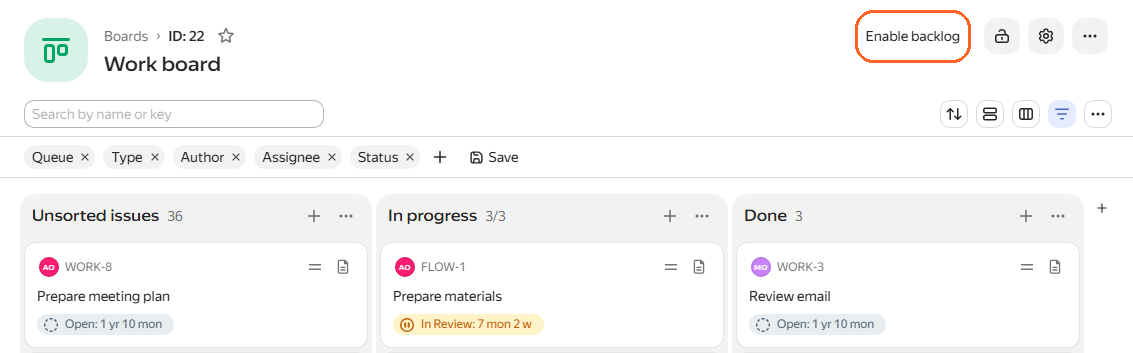
-
If the board already contains issues, choose where to move them: to the backlog or a sprint.
The Backlog tab opens with backlog issues and sprints. For details, see Backlog: a project issue list.
What is Agile development
Agile development methodologies were created to manage software development. They are now used to manage projects and processes in many different fields.
The Agile tools in Yandex Tracker are based on the popular Scrum methodology. Scrum includes practices, roles, and tools that help organize teamwork.
- Backlog
- In Scrum, the list of all work the team needs to complete is called a backlog. It can include customer requirements, user requests, and other tasks. In Yandex Tracker, a backlog can consist of issues, stories, and epics. Backlog issues are usually ordered by priority. Backlog: a project issue list
- Sprint
- Project work is split into short iterations called sprints. A sprint usually lasts one to four weeks. At the start of each sprint, team members take several issues from the backlog that they plan to complete. By the end of the sprint, all planned issues should be complete. For product development, the end of a sprint should result in new functionality, or an increment. Sprints: development iterations
- Planning poker
- Planning poker is often used to plan a sprint. It is a team method for estimating issue complexity using cards with Story Point values. The team estimates issues together by comparing them with a simple reference issue. Based on the estimates, the team decides how many issues it can complete in the current sprint. Planning poker for issue estimation
- Story Point
- A relative unit for estimating issue effort. A Story Point is not usually equivalent to a fixed number of person-hours.
- Burndown chart
- If all sprint issues are estimated, you can build a burndown chart. It shows how much work remains in the current sprint. Burndown chart for tracking sprint progress
- Issue board
- A board for tracking the status of issues in the current sprint. Board columns correspond to issue statuses. Cards with issue descriptions are placed on the board and moved between columns as issue statuses change.
- User story
- A description of a feature to implement in a product based on user needs or problems. A user story is broken down into individual issues. In Yandex Tracker, you can use Story issues to group issues based on a shared subject. How to use epics and user stories
- Epic
- A large feature or requirement that cannot be implemented within a single sprint. It is usually broken down into several user stories or issues. In Yandex Tracker, you can use Epic issues to group issues based on a shared subject. How to use epics and user stories
- Sub-epic
- An issue that is included in an epic.
In Agile, an epic is a large task or requirement that cannot be completed in one sprint.
A user story is a description of a feature or capability from the user's perspective. In Tracker, the Story issue type can be used to group issues with a common theme.