Notifications from apps
Yandex apps use notifications to remind you to review and rate organizations and events you've recently visited. After installing them on your smartphone or tablet, you'll start receiving notifications prompting you to give a rating and write a review.
List of apps
You'll receive notifications after installing the following apps:
-
Alert
Notifications are enabled by default.
You'll receive notifications after installing the following apps:
Why did I receive a notification?
Yandex prompts you to write reviews of organizations you've previously visited. These suggestions are based on location data, which is sent to Yandex only with your permission.
Alert
The Yandex home page uses location data to display the local weather forecast, the event calendar, and information about traffic in your city. Your location also affects the search results. For example, if you're looking for a gym, Yandex will show you the nearest fitness clubs.
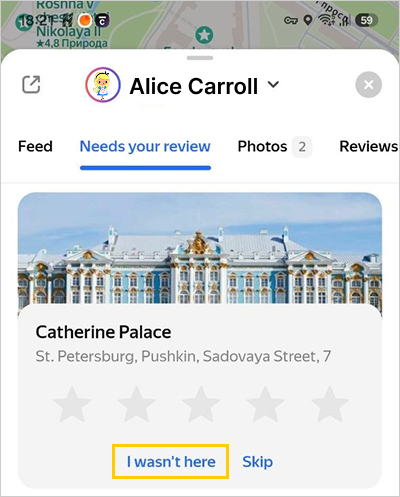
I received a notification even though I haven't visited the organization
- Tap the notification.
- Tap I wasn't here at the bottom of the screen.
Disable notifications
Yandex Maps
- In the upper-left corner of the screen, tap your profile picture.
- Select Settings → Notifications.
- Disable Place ratings.
Yandex Navigator
- In the lower-right corner of the screen, tap
 .
. - In the upper-left corner of the screen, tap
 .
. - Select Notifications.
- Disable Reviews of places you visited.
Yandex search app
- In the bottom right corner of the screen, tap your profile picture.
- Tap Settings.
- Under Notifications, tap Push notifications.
- Disable Visited places.
Yandex Maps
- In the upper-left corner of the screen, tap your profile picture.
- Select Settings → Notifications.
- Disable Place ratings.
Yandex Navigator
- In the lower-right corner of the screen, tap .
- In the upper-left corner of the screen, tap .
- Select Notifications.
- Disable Reviews of places you visited.
Yandex search app
- In the bottom right corner of the screen, tap your profile picture.
- Select Settings → Push notifications.
- Disable Visited places.
- Yandex search app
- Yandex Navigator
- Yandex Maps