Dynamic placements in search resultsβ
Dynamic placements in search resultsβ are additional ad placements that appear in search results. They can help you generate more clicks and conversions by increasing the visibility of the promoted page. These placements don't decrease the total number of organic search results.
During the beta test, ads in dynamic placements are served only to users who are located in Russia.
How it works
Dynamic placements follow the same rules as placing ads on Yandex Search via Yandex Direct. Impressions are served based on the classic VCG auction mechanism used by Yandex Direct, as well as on the Yandex Search ranking technology, with ad relevance being the primary factor.
For your ad to appear on a dynamic placement, a few conditions must be met:
-
You can enable dynamic placements only if you've enabled advertising in search results.
-
The ad must win the auction based on a combination of several metrics, including bid amount, ad quality, and relevance. This takes into account the targeting settings, including keywords, autotargeting, geography, and other factors. Only pages that are highly relevant to the search query and were selected through organic ranking can appear in a dynamic placement.
After winning an auction, the ad appears on a dynamic placement in search results without affecting other placements. For product categories such as "Deposits", "Debit cards", "Credit cards", and "Cash loans", ads may appear in dynamic placements in the Finance vertical and the "Banking services" widget in search results. If you're promoting products, your ads may appear in a dynamic placement within the "Popular products" widget in search results as well as the "Products" vertical.
Yandex will automatically generate an ad format suitable for dynamic placements based on your ad settings in Yandex Direct and the snippet content of the selected page for that search query.
Clicks on dynamic placements can be factored into ranking. Note that we aim to consider all useful factors in our algorithms, ensuring that purchasing dynamic placements doesn't give pages an advantage in search rankings.
URL parameters (including UTM tags) from your campaigns are automatically added to the final ad links. If you've filled out the URL parameters field, all parameters listed there will be included. If you leave this field empty, popular parameters (like utm, k50id, adjust, or roistat) may be automatically extracted from the specified ad link and included in the final ad link.
How to configure
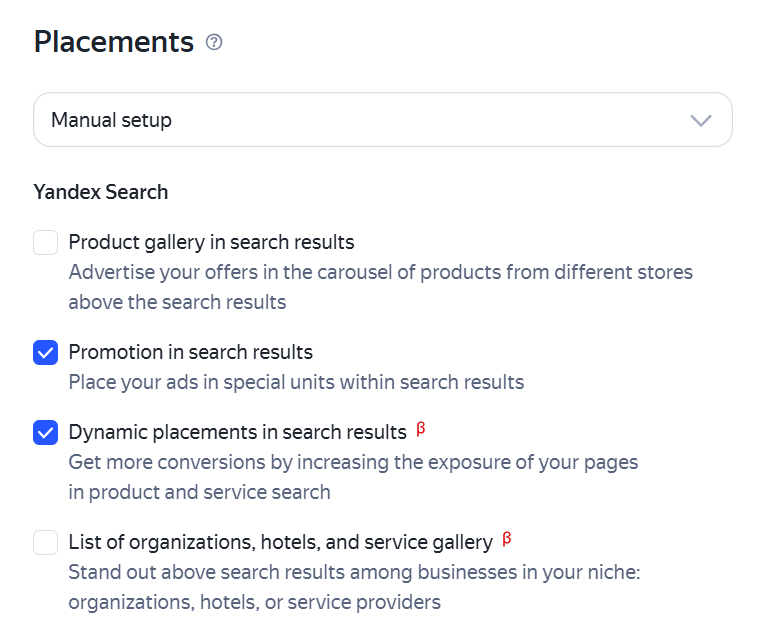
Enable Ads in search results and Dynamic placements in search resultsβ in the unified performance campaign settings. In new campaigns, these options are already selected by default. For existing campaigns, you need to enable them manually.
For Yandex Search, Yandex Advertising Network, and Yandex Maps, dynamic placements are selected by default because this setting includes all available options.
The Campaign Wizard, product campaigns, and Quick start use the new placement type by default.
Advanced URL matching
This enables a single ad pointing to your homepage to cover a wide range of pages on your website, so you don't have to manually collect and maintain a list of links in Yandex Direct.
How it works
If an ad uses your website's homepage as its landing page, the system may select a more relevant page from your website for dynamic placements based on a specific search query. This happens when the following conditions are met at the same time:
-
An ad with the homepage URL was selected for the auction based on your targeting settings (keywords, autotargeting, display regions, and others).
-
Organic ranking selected a more relevant page on the website for the same search query, such as a specific product page or category.
Example
Your ad link uses
store.yandex.ruas its landing page and targets the search query "buy red rug with cat". When someone enters this query, search ranking picks the matching page:store.yandex.ru/product/1790rm.
How it worked before: This ad couldn't enter the auction for a dynamic placement for this query because the URLs didn't match.
How it works now: The ad can enter the auction. If it wins, it will appear in a dynamic placement with the link
store.yandex.ru/product/1790rm. The system automatically generates the ad format using snippet content from the matched page and your ad settings in Yandex Direct. This ensures that the ad title, ad text, and landing page that appear to the user all match each other.
Features and limitations
-
The ad and the selected page must help achieve the same business goals. The auction will run and show the more relevant page only if the system expects a high chance of a conversion action specified in your campaign.
-
Exact URL matching takes priority. If your campaign contains an ad that exactly matches the search result URL, the user will see that specific ad.
How to manage landing pages
Warning
You can only filter pages in unified performance campaigns.
If you want to stop certain pages or sections of your website from showing up on dynamic placements (like blog posts or old promo pages):
-
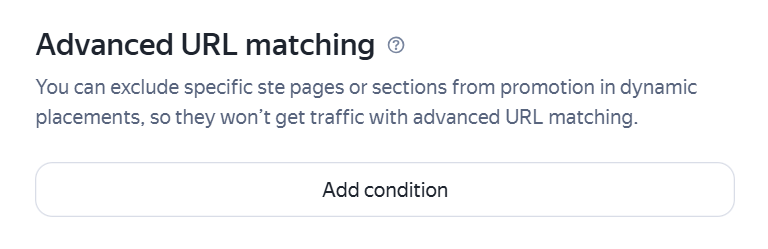
Go to advanced campaign settings and click Add condition under Advanced URL matching.
-
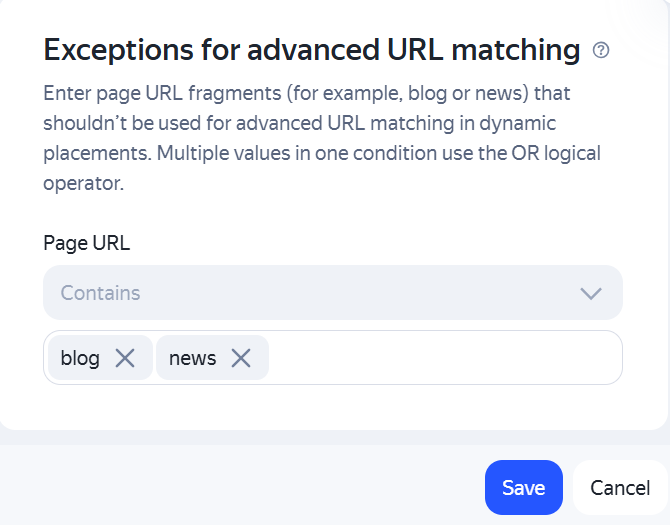
In the window that opens, enter parts of the website addresses that the URLs contain. You can combine multiple values into a single condition using the logical OR operator.
Tip
Keep in mind that advanced URL matching aims to pick out only high-converting pages. Give it some time to collect data before adding URL exclusion filters. That way, you won't accidentally filter out high-converting traffic when your campaign starts.
Payment
If your page is highly relevant to a search query, ranks well organically, and wins the auction, it'll be featured in a more prominent dynamic placement. Note that you'll still pay only for additional clicks and conversions. The baseline traffic from organic ranking, which the page would have received even without a dynamic placement, remains free.
For example, a search snippet with the same URL receives 110 clicks with dynamic placements and 100 clicks without them. Here, 100 clicks are considered the baseline traffic, while the additional 10 are attributed to dynamic placement. In this case, you're only charged for 10 clicks.
If a user clicks the same ad with the same URL in both a dynamic placement and, for example, in a Premium placement position as part of a single search, only one click counts and appears in statistics, and you're charged only for that click.
Under the pay-per-click model, you're charged for each additional click. Under the pay-per-conversion model, you pay for conversions resulting from these additional clicks.
How to analyze the results
In Yandex Direct Pro
You can evaluate the performance of the new placement type in the Report Wizard as well as on the Overview page.
-
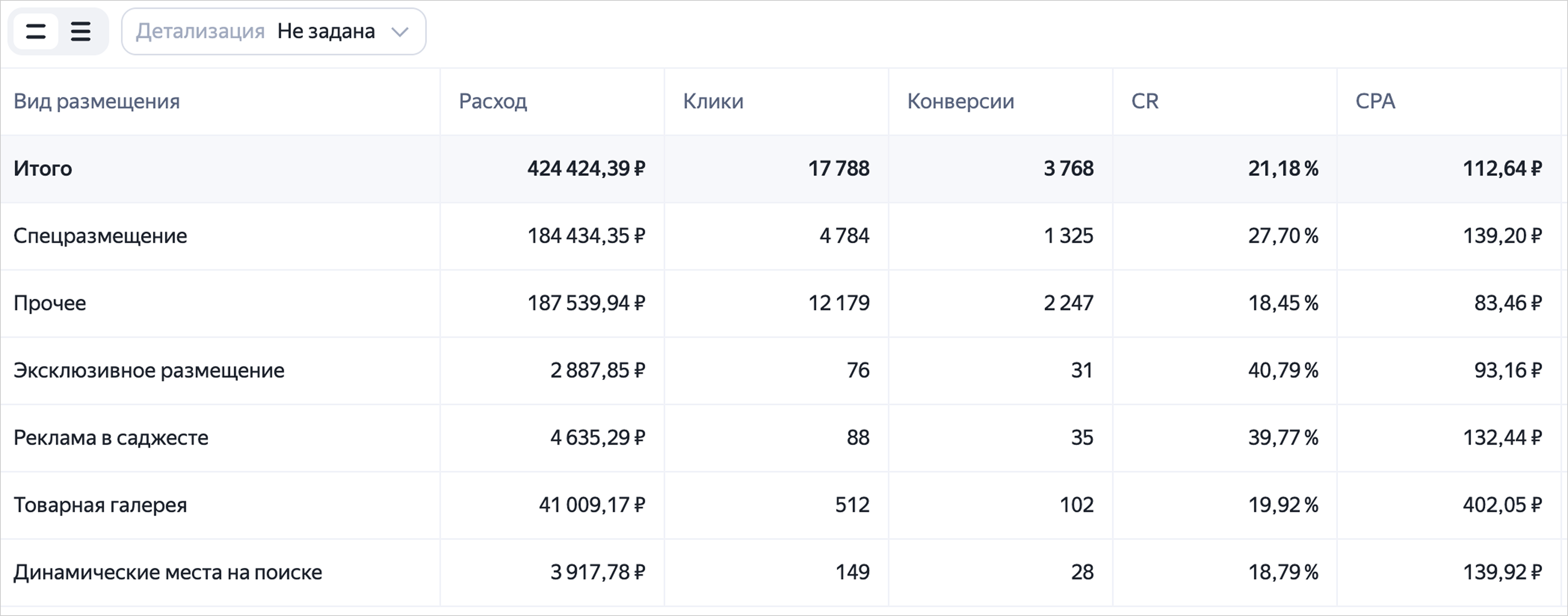
In the Report Wizard, select the Placement type dimension. In the table, the data you're looking for is in the row titled Dynamic placements in Yandex Search.
-
On the Overview page, select Add filter → Type of placement → Dynamic placements in search results.
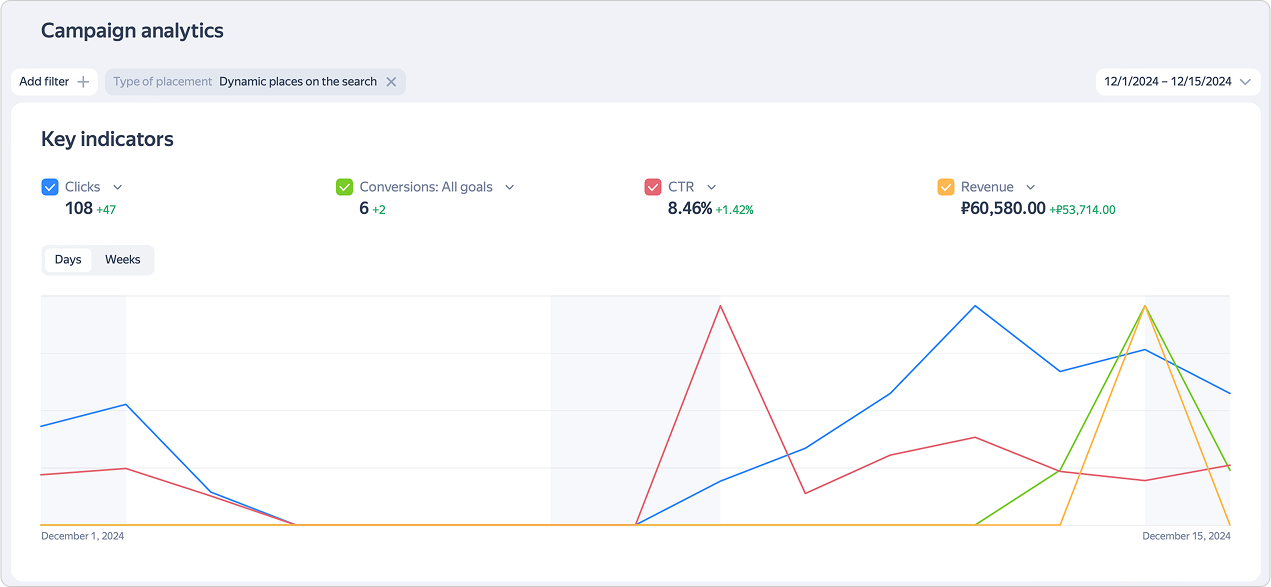
These reports only show statistics for impressions that resulted in additional clicks and conversions. These statistics don't include your baseline traffic from search results.
-
In addition, the Overview page features the advanced report Dynamic placements in search results, which shows all your impressions from dynamic placements. To generate this report, under Performance summary, select Report → Dynamic placements in search results.
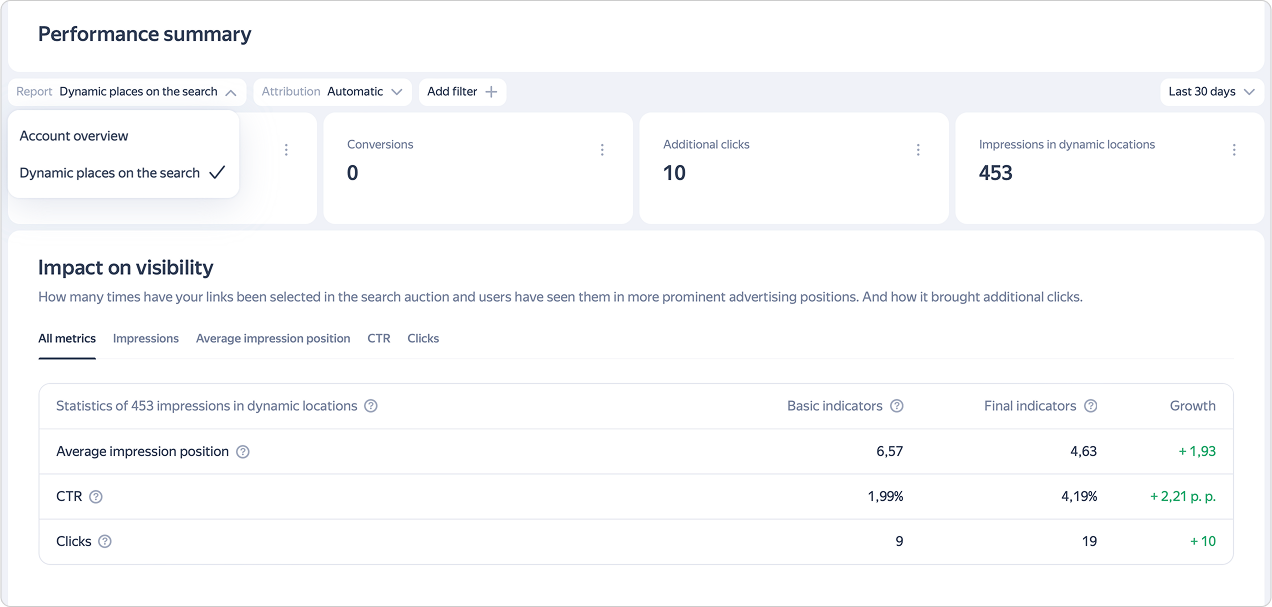
This report provides a comprehensive performance overview, showing how many times an ad appeared in placements of the new type, how many baseline and additional clicks it received, and how much the ad's visibility and CTR increased.
In Yandex Metrica
For the traffic source, sessions resulting from baseline clicks on dynamic placements are attributed to Search engine traffic — Yandex, while sessions from additional clicks are attributed to Ad traffic — Yandex Direct.
In Yandex Webmaster
Starting July 15, 2025, statistics on the effectiveness of dynamic placements are accessible via the API and in the reports and charts of the "Query monitoring", "Query statistics", and "Page statistics" tools. You can analyze this data alongside overall site statistics or conduct a detailed analysis via the API. For more information, see the Yandex blog.
Why can't I see my statistics on dynamic placement?
Possible reasons:
-
You selected an incorrect period — try selecting different dates.
-
Your account doesn't have any campaigns with dynamic placements.
-
The report filters only show campaigns without dynamic placements.
-
Dynamic placements are enabled, but the page doesn't rank organically for a search query.
-
The ad failed to win any auctions based on a combination of your bid amount and the ad's quality metrics.
What can I do to increase my metrics?
To maximize the effectiveness of dynamic placements:
-
Use your homepage as the ad's landing page. Advanced URL matching will automatically cover all relevant offers on dynamic placements, so you don't have to manually create separate ads for every single link.
-
Improve the quality and user friendliness of your site. For example, make sure there are no technical issues that may hinder indexing and that your site is responsive on mobile devices. This helps improve the site's rankings in Yandex Search results.
Create useful, engaging content that is relevent to user queries and optimize the meta tags to improve the appearance of your site in search results.
-
Review the targeting restrictions. For your ad to participate in more auctions, consider broadening the criteria. For example, select additional autotargeting categories.
-
Review the budget limits. If the campaign already approaches them, increase the limit by at least 10% after enabling dynamic placements. This allows the system to take full advantage of the new placements.
Have questions?
Alert
Our customer support can only assist you with campaigns linked to the username you are contacting us from. You can check your username by opening ya.ru in another browser tab. Our team can access your data only when processing your request.
Scan the QR code or tap it to follow the link.

When choosing Telegram, please note that Yandex does not control or take responsibility for how third-party messaging apps store your data and chat history.